
Self-Host Opik: Open-Source LLM Observability with Docker
What is Opik?
Opik (built by Comet) is an open-source platform for the full lifecycle of LLM applications. It gives you comprehensive tracing, evaluation, and monitoring so you can understand exactly what your AI agents are doing — in development and in production.
Why it's trending: With 19K+ GitHub stars and active daily development, Opik fills a critical gap. As teams move LLM prototypes to production, they need visibility into token usage, latency, hallucination rates, and prompt effectiveness. Opik provides this out of the box with 40+ native integrations (LangChain, OpenAI, Anthropic, CrewAI, Dify, Mastra, OpenWebUI, and more).
Key Capabilities
- Traces & Spans — Track every LLM call with full context (input, output, tokens, latency, metadata)
- Evaluation — LLM-as-a-judge metrics for hallucination detection, answer relevance, context precision
- Datasets & Experiments — Version your prompts and run A/B evaluations
- Playground — Iterate on prompts side-by-side before deploying
- Production Monitoring — Dashboards for trace counts, token usage, and feedback scores
- Agent Optimizer — Automatically improve prompts and tool selection
Architecture Overview
Opik's self-hosted deployment consists of seven core services orchestrated with Docker Compose:
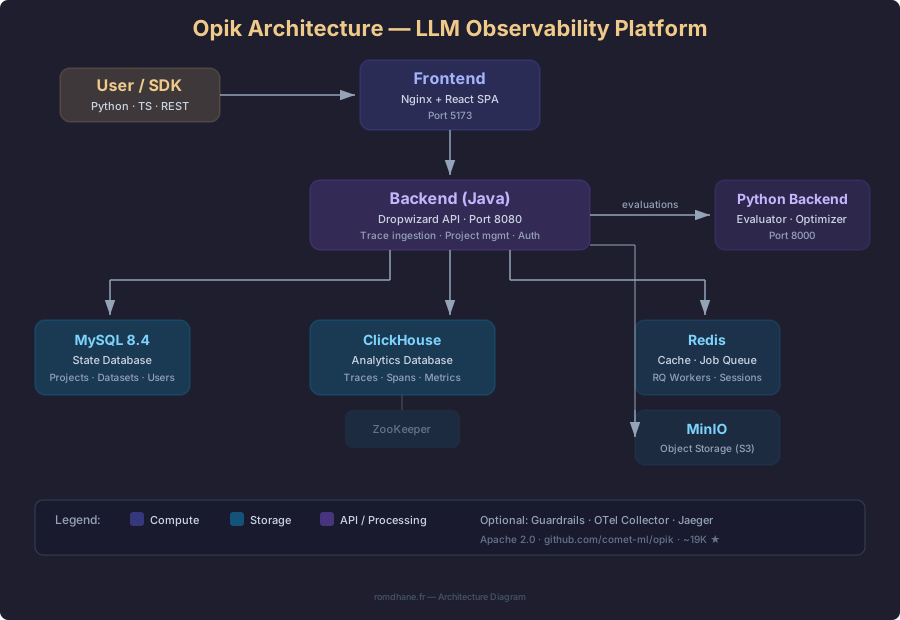
- Frontend — Nginx + React SPA served on port 5173. The web dashboard for exploring traces, running experiments, and managing projects.
- Backend (Java/Dropwizard) — The core API server. Handles trace ingestion, project management, authentication, and coordinates evaluations via the Python backend.
- Python Backend — Dedicated service for running LLM evaluations (scoring) and the Agent Optimizer. Uses RQ (Redis Queue) for async job processing.
- MySQL 8.4 — Stores state data: projects, datasets, experiment configurations, and user accounts.
- ClickHouse — Columnar analytics database optimized for high-volume trace/spans ingestion (40M+ traces/day).
- Redis — In-memory cache and job queue backbone.
- MinIO — S3-compatible object storage for trace attachments and media.
Optional services include Guardrails (content safety filters) and the OpenTelemetry stack (OTel Collector + Jaeger) for infrastructure observability.
Prerequisites
- Docker Engine 24+ and Docker Compose v2
- 8 GB RAM (16 GB recommended for evaluation workloads)
- 10 GB free disk space
- Linux, macOS, or Windows (WSL2)
Step 1: Clone and Launch
git clone https://github.com/comet-ml/opik.git
cd opik

# Start the full Opik platform
./opik.sh
The launcher script handles everything: pulling images, starting infrastructure (MySQL, ClickHouse, Redis, MinIO, ZooKeeper), then bringing up the backend and frontend. First launch takes 3-5 minutes while images download.
Once ready, open http://localhost:5173 in your browser.
Service Profiles
You can start Opik in different modes using the --profile flag:
./opik.sh --infra          # Databases and caches only
./opik.sh --backend        # Infra + backend services
./opik.sh                  # Full Opik suite (default)
./opik.sh --guardrails     # Full suite + content safety
./opik.sh --backend --guardrails  # Backend + guardrails
For production-like deployments with the OpenTelemetry stack:
./opik.sh --opik-otelStep 2: Install the Python SDK
pip install opikConfigure the SDK to talk to your local instance:
opik configureWhen prompted for the server address, enter http://localhost:5173/api (or leave blank and set use_local=True in code).
Alternatively, configure programmatically:
import opik
opik.configure(use_local=True)
Step 3: Log Your First Trace
Create a Python script to verify the setup:
import opik
from openai import OpenAI

opik.configure(use_local=True)
client = OpenAI()

@opik.track
def ask_llm(question: str) -> str:
    response = client.chat.completions.create(
        model="gpt-4o-mini",
        messages=[{"role": "user", "content": question}]
    )
    return response.choices[0].message.content

result = ask_llm("What is LLM observability?")
print(result)
Run the script, then refresh your Opik dashboard at http://localhost:5173. You'll see a new trace under Projects → Default Project, showing:
- Input prompt and model response
- Token count and latency
- Nested spans (if you add more
@opik.trackdecorators)
Using Framework Integrations
If you're already using LangChain, LlamaIndex, or CrewAI, Opik auto-instruments them. For example, with LangChain:
import opik
opik.configure(use_local=True)

# Opik automatically patches LangChain
from langchain_openai import ChatOpenAI
from langchain_core.prompts import ChatPromptTemplate

llm = ChatOpenAI(model="gpt-4o-mini")
prompt = ChatPromptTemplate.from_template("Explain {topic} in one sentence.")
chain = prompt | llm

# This call is automatically traced
result = chain.invoke({"topic": "retrieval-augmented generation"})
No decorators needed — Opik's LangChain integration captures every chain step automatically.
Step 4: Run Evaluations
Opik's evaluation framework lets you measure quality with LLM-as-a-judge metrics:
from opik.evaluation.metrics import (
    Hallucination,
    AnswerRelevance,
    ContextPrecision
)

# Check for hallucination
hallucination_metric = Hallucination()
score = hallucination_metric.score(
    input="What is the capital of France?",
    output="Paris",
    context=["France is a country in Europe."]
)
print(f"Hallucination score: {score}")

# Evaluate answer relevance
relevance = AnswerRelevance()
score = relevance.score(
    input="Explain quantum computing",
    output="Quantum computing uses qubits...",
)
print(f"Relevance score: {score}")
To run a systematic evaluation, create a dataset of test cases and run an experiment:
from opik import Opik
from opik.evaluation import evaluate

client = Opik()
dataset = client.get_or_create_dataset("QA benchmark")

# Insert test cases
dataset.insert([
    {"input": "What is Docker?", "expected_output": "A containerization platform"},
    {"input": "Define Kubernetes", "expected_output": "Container orchestration system"},
])

# Define your evaluation task
def evaluation_task(item):
    # Your LLM call here
    return {"output": "...", "context": ["..."]}

# Run experiment
evaluate(
    experiment_name="My first eval",
    dataset=dataset,
    task=evaluation_task,
    scoring_metrics=[Hallucination(), AnswerRelevance()],
)
Results appear in the Opik Experiments dashboard, where you can compare runs side by side.
Verification Checklist
After deployment, verify each component:
- Frontend loads at
http://localhost:5173 - Backend health check:
curl http://localhost:5173/api/health-check - Python backend:
curl http://localhost:8000/healthcheck - MySQL:
docker exec opik-mysql-1 mysqladmin ping -h 127.0.0.1 --silent - ClickHouse:
curl http://localhost:8123/ping - Redis:
docker exec opik-redis-1 redis-cli -a opik ping - MinIO console:
http://localhost:9090(login with credentials from compose) - First trace appears in the dashboard after running the test script
Managing Opik
View logs:
docker compose -f deployment/docker-compose/docker-compose.yaml --profile opik logs -fStop Opik:
docker compose -f deployment/docker-compose/docker-compose.yaml --profile opik downUpdate to latest:
git pull
docker compose -f deployment/docker-compose/docker-compose.yaml --profile opik pull
./opik.sh
Data persistence: All data survives container restarts via named Docker volumes (mysql, clickhouse, redis-data, minio-data, zookeeper). To fully reset, remove the volumes:
docker compose -f deployment/docker-compose/docker-compose.yaml --profile opik down -vResources
- GitHub: comet-ml/opik — 19K+ stars, Apache 2.0
- Documentation: comet.com/docs/opik
- Integrations: 40+ frameworks including LangChain, OpenAI, Anthropic, CrewAI, Dify, Mastra
- Community: Slack · Twitter/X
- Alternative tools: LangSmith (commercial), LangFuse (open-source), Phoenix/Arize (open-source)