
Obscura — A Rust-Powered Headless Browser That's 10x Faster Than Chrome for AI Agents
Obscura — A Rust-Powered Headless Browser That's 10x Faster Than Chrome for AI Agents
What is Obscura?
Obscura is an open-source headless browser engine written in Rust, purpose-built for AI agent automation and web scraping at scale. It's a drop-in replacement for headless Chrome that uses 90% less memory, loads pages 6x faster, and boots instantly — all while staying fully compatible with Puppeteer and Playwright via the Chrome DevTools Protocol (CDP).
GitHub: github.com/h4ckf0r0day/obscura
Stars: ⭐ 9,300+ (and climbing fast)
License: Apache 2.0
Why this matters: If you're running AI agents (Claude Code, Codex, browser-use, etc.) or large-scale scrapers, headless Chrome is often the heaviest dependency in your stack. Obscura slashes resource usage by an order of magnitude.
Key Features
| Metric | Obscura | Headless Chrome |
|---|---|---|
| Memory | 30 MB | 200+ MB |
| Binary size | 70 MB | 300+ MB |
| Page load | 85 ms | ~500 ms |
| Startup | Instant | ~2 s |
| Anti-detection | Built-in | None |
| Puppeteer/Playwright | Yes | Yes |
- Real JavaScript — Powered by V8, not a toy. Runs actual JS, XHR, fetch, and DOM manipulation.
- CDP Server — Full Chrome DevTools Protocol support. Connect Puppeteer or Playwright and it just works.
- Stealth Mode — Anti-fingerprinting, tracker blocking (3,520 domains),
navigator.webdrivermasking. - Three CLI Commands —
fetch(single page),serve(CDP server),scrape(parallel bulk). - Single Binary — No Chrome, no Node.js, no npm. One
curland you're done.
Architecture Overview
Obscura is composed of six Rust crates:
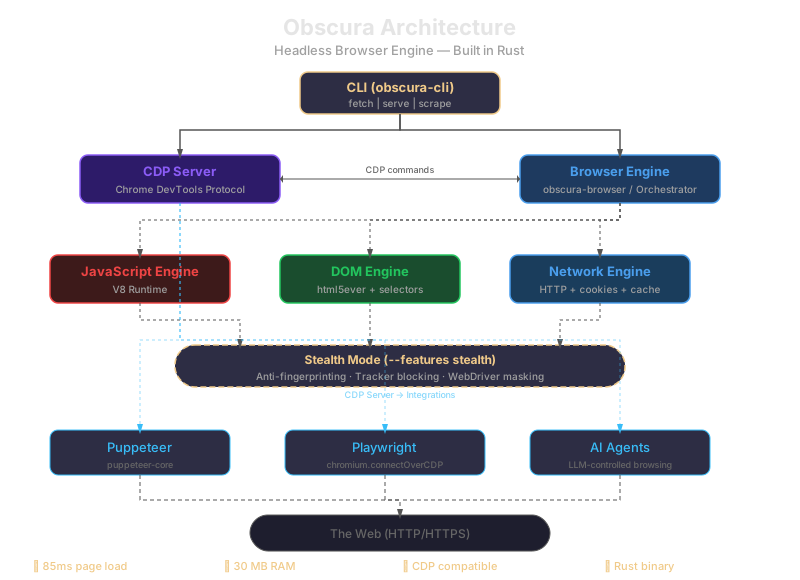
The CLI feeds into either the CDP WebSocket server (for external tooling) or directly into the browser engine. The browser engine orchestrates V8 for JS, html5ever for DOM, and reqwest for networking. Stealth mode wraps the engine in anti-detection layers.
Prerequisites
- Linux x86_64 (binary), or macOS (Apple Silicon / Intel)
- Rust 1.75+ (only if building from source)
- No Chrome, no Node.js, no Docker required
Setup Guide
Option 1: Download the Binary (Recommended)
# Linux
curl -LO https://github.com/h4ckf0r0day/obscura/releases/latest/download/obscura-x86_64-linux.tar.gz
tar xzf obscura-x86_64-linux.tar.gz
sudo mv obscura /usr/local/bin/

# macOS (Apple Silicon)
curl -LO https://github.com/h4ckf0r0day/obscura/releases/latest/download/obscura-aarch64-macos.tar.gz
tar xzf obscura-aarch64-macos.tar.gz
sudo mv obscura /usr/local/bin/

# Verify
obscura --help
Option 2: Build from Source
git clone https://github.com/h4ckf0r0day/obscura.git
cd obscura

# Standard build (~5 min first time, V8 compiles from source)
cargo build --release

# With stealth mode
cargo build --release --features stealth

sudo cp target/release/obscura /usr/local/bin/
Option 3: Docker (if you prefer containers)
Since Obscura is a single static binary, you can containerize it yourself:
FROM alpine:3.20
COPY obscura /usr/local/bin/obscura
EXPOSE 9222
ENTRYPOINT ["obscura"]
CMD ["serve", "--port", "9222"]
Build and run:
docker build -t obscura .
docker run -d -p 9222:9222 obscura serve --port 9222
Step-by-Step Usage
1. Quick Page Fetch
# Get a page title
obscura fetch https://news.ycombinator.com --eval "document.title"
# → "Hacker News"

# Dump all links
obscura fetch https://example.com --dump links

# Render JS-heavy page
obscura fetch https://example.com --wait-until networkidle0 --dump html
2. Start the CDP Server
obscura serve --port 9222

# With stealth mode
obscura serve --port 9222 --stealth
3. Connect Puppeteer
npm install puppeteer-coreimport puppeteer from 'puppeteer-core';
const browser = await puppeteer.connect({
browserWSEndpoint: 'ws://127.0.0.1:9222/devtools/browser',
});
const page = await browser.newPage();
await page.goto('https://news.ycombinator.com');
const stories = await page.evaluate(() =>
Array.from(document.querySelectorAll('.titleline > a'))
.slice(0, 10)
.map(a => ({ title: a.textContent, url: a.href }))
);
console.log(stories);
await browser.disconnect();4. Connect Playwright
npm install playwright-coreimport { chromium } from 'playwright-core';
const browser = await chromium.connectOverCDP({
endpointURL: 'ws://127.0.0.1:9222',
});
const page = await browser.newPage();
await page.goto('https://en.wikipedia.org/wiki/Web_scraping');
console.log(await page.title());
await browser.close();5. Bulk Scraping
obscura scrape \
https://example.com/page1 \
https://example.com/page2 \
https://example.com/page3 \
--concurrency 25 \
--eval "document.querySelector('h1').textContent" \
--format json > results.json
Stealth Mode
Obscura's stealth mode is built-in — no plugins, no extra config. When enabled with --features stealth, it:
- Randomizes fingerprints per session (GPU, screen, canvas, audio, battery)
- Spoofs
navigator.userAgentDatawith realistic Chrome 145 values - Masks
navigator.webdriver→undefined(matches real Chrome) - Blocks 3,520 tracker domains (analytics, ads, telemetry, fingerprinting)
- Native function masking —
Function.prototype.toString()returns[native code]
Use Cases
- AI Agent Browsing — Give Claude Code or Codex a lightweight browser to navigate the web
- Web Scraping at Scale — 25 concurrent workers, JSON output, minimal memory
- Testing — Drop-in CDP-compatible browser for Playwright/Puppeteer test suites
- Monitoring — Lightweight page checks on a Raspberry Pi
- Social Media Automation — Login flows, posting, data extraction
Performance
| Page Type | Obscura | Headless Chrome |
|---|---|---|
| Static HTML | 51 ms | ~500 ms |
| JS + XHR + fetch | 84 ms | ~800 ms |
| Dynamic scripts | 78 ms | ~700 ms |