
Mirage: A Unified Virtual Filesystem for AI Agents — Complete Guide
Mirage: A Unified Virtual Filesystem for AI Agents — Complete Guide
AI agents today face a fragmentation problem. Every data source — S3, Gmail, Slack, GitHub, Notion, Redis — speaks its own API with its own SDK, authentication model, and rate limits. An agent that needs to grep Slack logs, copy a file from S3, and summarize a GitHub README must juggle three different SDKs, three authentication flows, and three response formats.
Mirage solves this by presenting every backend as a single virtual filesystem. Agents navigate it with the same bash commands they already know: ls, cat, grep, cp, find. No new SDK to learn. No MCP servers to wire up. Just a unified / tree where S3 lives at /s3, Slack at /slack, Gmail at /gmail, and GitHub at /github.
With 2,361 GitHub stars and rapidly growing, Mirage has become one of the most talked-about infrastructure tools for the AI agent ecosystem since its release in April 2026 by strukto.ai.
Why Mirage Is Trending
Traditional approaches to multi-service agent access have been clunky:
- MCP (Model Context Protocol) requires running separate servers per service
- Custom SDK integrations mean rewriting tool bindings for every model
- LangChain tools add framework lock-in
Mirage takes a radically simpler approach: use the filesystem as the universal API. LLMs are already fluent in bash — the filesystem paradigm is in their training data. By mounting services as directories, Mirage gives agents immediate access to every backend without teaching them a single new concept.
Architecture
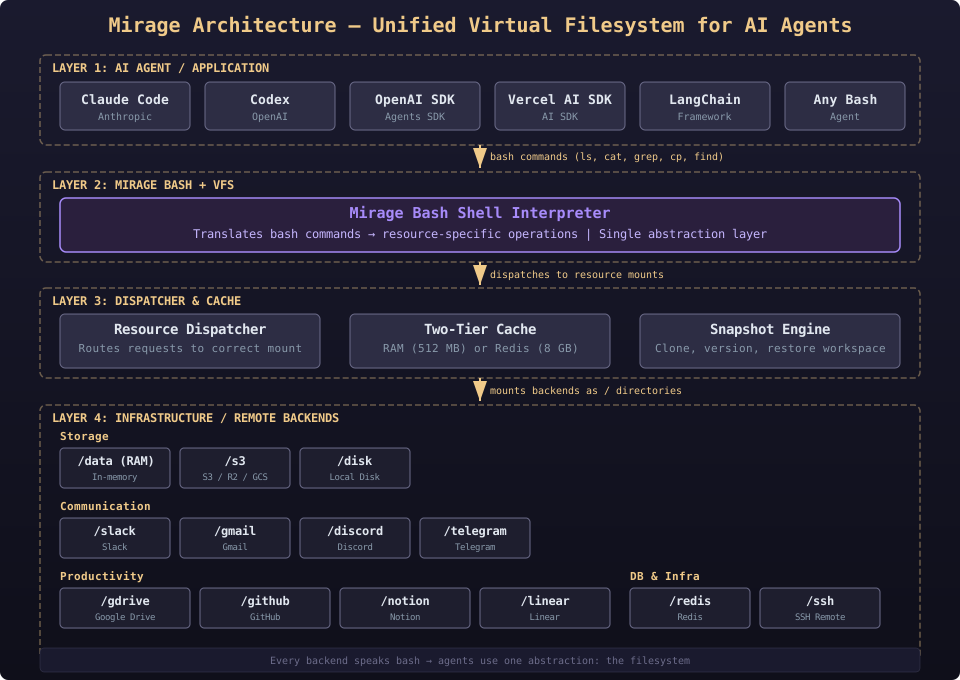
Mirage's architecture is a layered virtual filesystem:
- AI Agent / Application Layer — Claude Code, Codex, OpenAI Agents SDK, Vercel AI SDK, LangChain, or any bash-capable agent
- Mirage Bash + VFS Layer — A Unix-like shell interpreter that translates commands (
ls,cat,cp,grep) into backend-specific operations - Dispatcher & Cache Layer — Routes requests to the correct resource mount, with a two-tier cache (RAM or Redis) for performance
- Infrastructure / Remote Layer — All connected backends: S3, GDrive, Slack, Gmail, GitHub, Redis, Notion, Linear, SSH, and more
Every service speaks the same filesystem semantics, so agents reason about one abstraction instead of N SDKs.
Prerequisites
- Python ≥ 3.12 (for the Python SDK and CLI)
- Node.js ≥ 20 (for the TypeScript SDK)
- macOS or Linux (FUSE-based mounts require platform support)
- Redis (optional, for shared caching across workers)
Installation
Python (Recommended)
The Python package installs both the library and the CLI:
pip install mirage-ai
# Or with uv:
uv add mirage-ai
TypeScript
Choose the package matching your runtime:
npm install @struktoai/mirage-node      # Node.js servers and CLIs
npm install @struktoai/mirage-browser   # browser / edge runtimes
npm install @struktoai/mirage-core      # runtime-agnostic primitives
CLI (Standalone)
curl -fsSL https://strukto.ai/mirage/install.sh | shOr via npm:
npm install -g @struktoai/mirage-cliQuickstart
Python
Create a workspace that mounts multiple backends side-by-side:
from mirage import Workspace
from mirage.resource.ram import RAMResource
from mirage.resource.s3 import S3Config, S3Resource
from mirage.resource.slack import SlackConfig, SlackResource
from mirage.resource.gdocs import GDocsConfig, GDocsResource

ws = Workspace({
    "/data":  RAMResource(),
    "/s3":    S3Resource(S3Config(bucket="my-bucket")),
    "/slack": SlackResource(SlackConfig()),
    "/docs":  GDocsResource(GDocsConfig()),
})

# Use standard bash commands
await ws.execute("cp /s3/report.csv /data/report.csv")
await ws.execute("grep alert /s3/data/log.jsonl | wc -l")

# Snapshot the entire workspace
ws.snapshot("demo.tar")
TypeScript
The same workspace in TypeScript (works in Node and browser):
import { Workspace, RAMResource, S3Resource, SlackResource, GDocsResource } from '@struktoai/mirage-browser'

const ws = new Workspace({
  '/data':  new RAMResource(),
  '/s3':    new S3Resource({ bucket: 'my-bucket' }),
  '/slack': new SlackResource({}),
  '/docs':  new GDocsResource({}),
})

await ws.execute('cp /s3/report.csv /data/report.csv')
await ws.execute('grep alert /s3/data/log.jsonl | wc -l')
CLI
For direct terminal usage:
# Create a workspace from a YAML config
mirage workspace create ws.yaml --id demo

# Execute commands against it
mirage execute --workspace_id demo --command "cp /s3/report.csv /data/report.csv"

# Snapshot and restore
mirage workspace snapshot demo demo.tar
mirage workspace load demo.tar --id demo-restored
Configuration
YAML Workspace Configuration
Create a ws.yaml to define your mounts declaratively:
id: production
mounts:
  /data:
    type: ram
  /s3:
    type: s3
    config:
      bucket: my-bucket
      region: us-east-1
  /slack:
    type: slack
    config:
      token: ${SLACK_BOT_TOKEN}
  /github:
    type: github
    config:
      token: ${GITHUB_TOKEN}
Then load it:
mirage workspace create ws.yaml --id production
mirage execute --workspace_id production --command "find /github -name '*.md' | head -5"
Redis Cache Configuration
For production deployments with multiple workers, share the cache via Redis:
from mirage import Workspace
from mirage.cache import RedisFileCacheStore, RedisIndexCacheStore

ws = Workspace(
    {"/s3": S3Resource(S3Config(bucket="my-bucket"))},
    cache=RedisFileCacheStore(url="redis://localhost:6379/0", limit="8GB"),
    index=RedisIndexCacheStore(url="redis://localhost:6379/0", ttl=600),
)
Connecting to Agent Frameworks
OpenAI Agents SDK
Plug Mirage as a sandbox into the OpenAI Agents SDK:
from agents import Runner
from agents.run import RunConfig
from agents.sandbox import SandboxAgent, SandboxRunConfig
from mirage.agents.openai_agents import MirageSandboxClient

client = MirageSandboxClient(ws)
agent = SandboxAgent(
    name="Mirage Sandbox Agent",
    model="gpt-5.4-nano",
    instructions=ws.file_prompt,
)

result = await Runner.run(
    agent,
    "Summarize /s3/data/report.parquet into /report.txt.",
    run_config=RunConfig(sandbox=SandboxRunConfig(client=client)),
)
Vercel AI SDK
Expose workspace mounts as AI SDK tools:
import { generateText } from 'ai'
import { openai } from '@ai-sdk/openai'
import { mirageTools } from '@struktoai/mirage-agents/vercel'
import { buildSystemPrompt } from '@struktoai/mirage-agents/openai'

const { text } = await generateText({
  model: openai('gpt-5.4-nano'),
  system: buildSystemPrompt({ mountInfo: { '/': 'In-memory filesystem' } }),
  prompt: "Read /docs/paper.pdf, then describe it.",
  tools: mirageTools(ws),
})
Claude Code / Codex
Use the CLI daemon to give Claude Code direct filesystem access:
mirage workspace create ws.yaml --id claude-workspace
mirage execute --workspace_id claude-workspace --command "cat /github/my-repo/README.md"
Available Resource Mounts
Mirage supports a growing list of backends as resource mounts:
- Storage — RAM, Disk, S3 / R2 / OCI / Supabase / GCS
- Communication — Slack, Discord, Telegram, Email (IMAP/SMTP)
- Productivity — Gmail, Google Drive, Google Docs, Google Sheets, Google Slides
- Development — GitHub, Linear, Notion, Trello
- Databases — Redis, MongoDB
- Infrastructure — SSH (remote filesystem access)
Every mount supports the same bash commands: ls, cat, cp, mv, rm, grep, find, wc, head, tail.
Verification Checklist
- Mirage CLI installed:
mirage --version - Workspace created with at least one mount
lson a mount returns expected contentcatreads a file from a remote backendgrepsearches across mount boundariescpcopies between different mounts (e.g.,/s3/file→/data/file)- Snapshot creates a valid
.tararchive - Restored workspace has all original data
- Redis cache configured for multi-worker deployments
- Agent framework integration works (OpenAI SDK or Vercel AI SDK)
Resources
- GitHub: github.com/strukto-ai/mirage
- Documentation: docs.mirage.strukto.ai
- Website: strukto.ai
- Discord: discord.gg/u8BPQ65KsS
- License: MIT