
MemPalace — Local-First AI Memory System That Achieves 96.6% Retrieval Recall Without Any LLM
MemPalace — Local-First AI Memory System That Achieves 96.6% Retrieval Recall Without Any LLM
What is MemPalace?
MemPalace is an open-source, local-first AI memory system that stores your conversation history as verbatim text and retrieves it via semantic search. Unlike most memory systems that summarize, extract, or paraphrase (losing critical context in the process), MemPalace keeps everything — every word, every decision, every debugging session.
GitHub: github.com/MemPalace/mempalace
Stars: ⭐ 51,800+ (exploding in popularity)
License: MIT
Version: 3.3.5
Why this matters: AI agents (Claude Code, Codex, Gemini CLI, etc.) have a fundamental limitation — they forget everything between sessions. MemPalace solves this by giving your AI a persistent "palace" of memories it can search at any time, with 96.6% retrieval recall on LongMemEval. And it runs entirely on your machine.
Key Features
- Verbatim storage — No summarization, no extraction, no paraphrase. Every word is preserved exactly as written.
- 96.6% R@5 on LongMemEval — Without any API key, cloud service, or LLM call. Pure semantic search.
- Pluggable backend — ChromaDB by default, with a clean interface for alternatives.
- Structured memory hierarchy — Wings (people/projects), Rooms (topics), Drawers (verbatim chunks).
- 29 MCP tools — Full read/write access, knowledge graph operations, cross-wing navigation.
- Temporal knowledge graph — Entity-relationship triples with validity windows, backed by local SQLite.
- Local-only — Nothing leaves your machine unless you opt in.
Benchmarks
| Metric | Score | LLM Required |
|---|---|---|
| LongMemEval R@5 (raw semantic) | 96.6% | None |
| LongMemEval R@5 (hybrid v4) | 98.4% | None |
| LongMemEval R@5 (+LLM rerank) | ≥99% | Any |
| LoCoMo R@10 (hybrid v5) | 88.9% | None |
| ConvoMem Avg Recall | 92.9% | None |
| MemBench (ACL 2025) R@5 | 80.3% | None |
Architecture Overview
MemPalace follows a modular layered architecture. Data flows from project files and conversation transcripts through miners and scanners, gets embedded into a vector store (ChromaDB), and is served through the CLI, MCP server, or Python API.
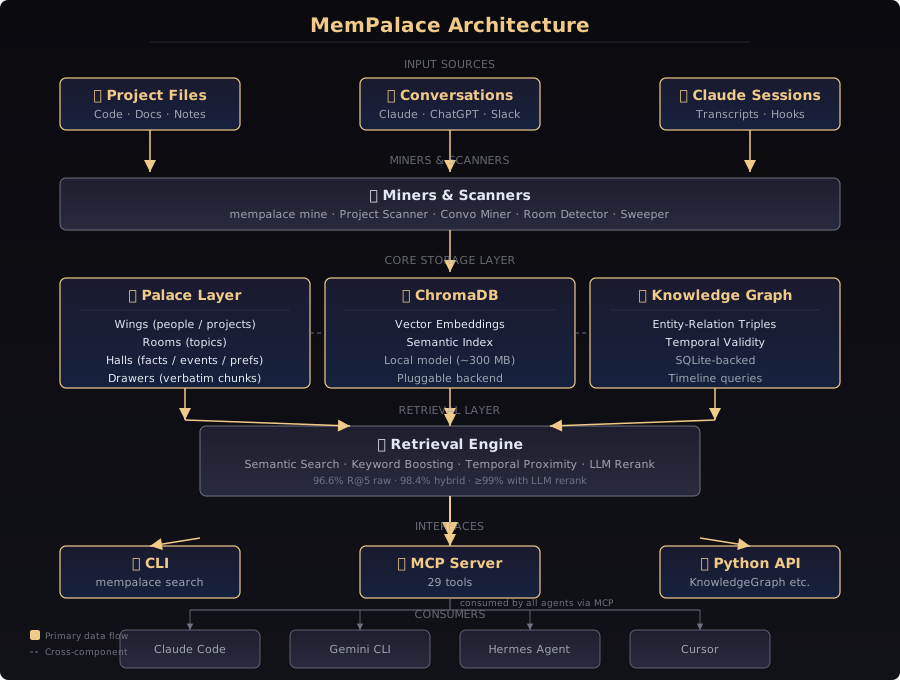
The system is organized into several key layers:
- Input Sources — Project files (code, docs, notes) and conversation exports (Claude Code sessions, ChatGPT exports, Slack logs).
- Miners & Scanners —
mempalace mineingests data from sources. The project scanner detects people, projects, and folder structure. The conversation miner processes chat transcripts. - Palace Layer — The core organizational model: Wings (people/projects), Rooms (topics), Halls (categories like facts/events/preferences), Drawers (verbatim text chunks).
- Embedding & Vector Store — ChromaDB stores vector embeddings of all content. The system uses a local embedding model (~300 MB), no API call needed.
- Knowledge Graph — A temporal entity-relationship graph (SQLite-backed) that tracks facts with validity windows.
- Retrieval Layer — Semantic search with optional keyword boosting, temporal proximity, and LLM reranking for highest precision.
- Interfaces — CLI (
mempalace search), MCP Server (29 tools), Python API, and auto-save hooks for Claude Code.
Prerequisites
- Python 3.9+
- ~300 MB disk space for the default embedding model
- uv (recommended) or pip for installation
- A project directory to index
Installation & Setup
Step 1: Install MemPalace
The recommended way is with uv, which puts the CLI in an isolated environment:
# Install with uv (recommended)
uv tool install mempalace

# Or with pip
pip install mempalace
Verify the installation:
mempalace --version
# Should output: mempalace 3.3.5
Step 2: Initialize Your Palace
MemPalace needs a project directory to scan:
# From outside the project
mempalace init ~/projects/myapp

# Or from inside the project directory
cd ~/projects/myapp
mempalace init
This scans your project directory and:
- Detects people and projects from file content
- Creates rooms from your folder structure
- Ensures the
~/.mempalace/config directory exists
Step 3: Mine Your Data
Now ingest content into your palace:
# Mine project files (code, docs, notes)
mempalace mine ~/projects/myapp

# Mine Claude Code sessions
mempalace mine ~/.claude/projects/ --mode convos

# Scope per project with --wing
mempalace mine ~/projects/myapp --wing myapp
mempalace mine ~/projects/another --wing another
The mining process is idempotent — running it multiple times won't duplicate content.
Step 4: Search Your Memories
# Basic search
mempalace search "why did we switch to GraphQL"

# Scoped search (wing only)
mempalace search "auth migration decision" --wing myapp

# Scoped to wing + room
mempalace search "deployment config" --wing myapp --room ci-pipeline
Step 5: Enable MCP Integration
To let your AI agent query MemPalace automatically, configure the MCP server.
Create or edit ~/.mempalace/config.yaml:
mcp:
enabled: true
transport: stdio
Then add it to your Claude Code or Hermes Agent MCP configuration:
{
  "mcpServers": {
    "mempalace": {
      "command": "mempalace",
      "args": ["mcp"]
    }
  }
}
Step 6: Auto-Save Hooks (Claude Code)
MemPalace provides hooks that automatically save your Claude Code session context periodically and before compression:
mempalace hooks installThis wires two hooks:
- Periodic save — saves every N messages
- Pre-compression save — saves before context window compression
# For per-message recall, run sweep periodically
mempalace sweep ~/.claude/transcripts/
Using the Knowledge Graph
The knowledge graph stores entity-relationship triples with time windows:
from mempalace.knowledge_graph import KnowledgeGraph

kg = KnowledgeGraph()

# Add facts with temporal validity
kg.add_triple("Kai", "works_on", "Orion", valid_from="2025-06-01")
kg.add_triple("Maya", "assigned_to", "auth-migration", valid_from="2026-01-15")

# Query everything about an entity
kg.query_entity("Kai")
# → [Kai → works_on → Orion (current)]

# Query as of a specific date
kg.query_entity("Maya", as_of="2026-01-20")
# → [Maya → assigned_to → auth-migration (active)]

# Timeline queries
kg.get_timeline("Maya")
MCP Tools Overview
MemPalace exposes 29 MCP tools covering:
- Palace reads/writes — Search, store, update memories
- Knowledge graph operations — Add triples, query entities, navigate timelines
- Cross-wing navigation — Find tunnels between wings
- Drawer management — Create, list, update verbatim drawers
- Agent diaries — Each specialist agent gets its own wing and diary
Comparison: MemPalace vs Alternatives
- Mem0 — Uses summarization (loses context), requires cloud API. MemPalace stores verbatim text and runs 100% locally.
- Mastra Memory — Summarized storage, cloud-dependent. MemPalace is local-first with no API key required.
- Hindsight — Different metrics, not directly comparable. MemPalace publishes reproducible benchmarks.
- Supermemory — Different architecture, cloud-backed. MemPalace is local-only.
- Zep — Uses Neo4j for graph. MemPalace uses SQLite (simpler, no external dependency).
Resources
- GitHub Repository: github.com/MemPalace/mempalace
- Official Documentation: mempalaceofficial.com
- Getting Started Guide: mempalaceofficial.com/guide/getting-started
- MCP Tools Reference: mempalaceofficial.com/reference/mcp-tools
- CLI Reference: mempalaceofficial.com/reference/cli
- Python API: mempalaceofficial.com/reference/python-api
- Discord Community: discord.com/invite/ycTQQCu6kn
- PyPI Package: pypi.org/project/mempalace