
Lightpanda: The Headless Browser Built from Scratch for AI Agents
Lightpanda: The Headless Browser Built from Scratch for AI Agents
AI agents need to browse the web. They need to navigate pages, click buttons, read content, and extract data. Until recently, most solutions relied on Headless Chromium or Playwright — browsers that were never designed for automation at scale. They're heavy, slow, and consume gigabytes of RAM for simple page loads.
Lightpanda changes this. It's a headless browser written entirely from scratch in Zig, with its own DOM implementation, V8 JavaScript engine integration, and a native MCP (Model Context Protocol) server. No Chromium fork. No WebKit patch. A new browser, purpose-built for AI agents and automation.
It uses 16× less memory (123 MB vs 2 GB) and runs 9× faster (5s vs 46s for 100 pages) compared to Headless Chrome on the same hardware. And it ships with a native MCP server — one binary, one command, and your AI agent has full browser capabilities.
Why Is It Trending?
Lightpanda has gained ~30,000 GitHub stars rapidly, driven by the explosion of AI agents that need to interact with the web. Every agent framework (Claude Desktop, Cursor, Windsurf, OpenClaw) needs a browser. Lightpanda is the first browser designed specifically for this use case.
Architecture Overview
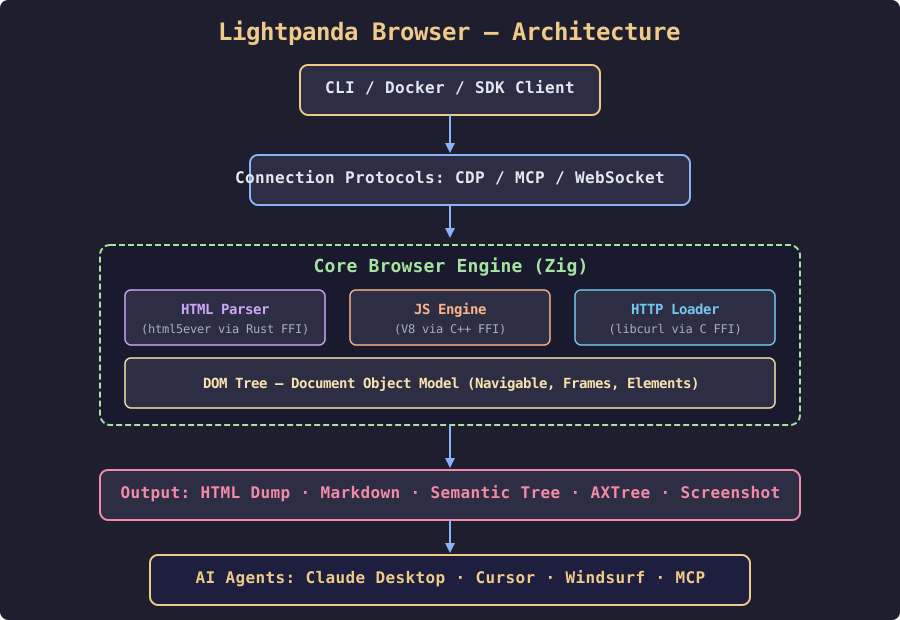
The architecture follows a clean layered design:
- Top layer: CLI, Docker, or SDK clients send navigation commands
- Protocol layer: CDP (Chrome DevTools Protocol), MCP (Model Context Protocol), or WebSocket connections
- Core engine (Zig): Three subsystems — HTML parser (html5ever via Rust FFI), JS Engine (V8 via C++ FFI), and HTTP loader (libcurl via C FFI) — all feeding into a shared DOM tree
- Output layer: HTML dump, Markdown, Semantic Tree, AXTree, or screenshots
- AI agent layer: Any MCP-compatible agent framework consumes the output
Prerequisites
- A Linux server (x86_64 or aarch64) or macOS machine
- Docker installed (for the containerized setup)
- OR a Zig 0.15.2 toolchain (for building from source)
- Basic familiarity with command-line tools
Getting Started
Option 1: Docker (Recommended)
The quickest way to try Lightpanda is the official Docker image:
# Pull and run the latest nightly build
docker run -d \
  --name lightpanda \
  -p 127.0.0.1:9222:9222 \
  lightpanda/browser:nightly
This starts the CDP server on localhost:9222. You can verify it's running:
curl -s http://127.0.0.1:9222/json/version | python3 -m json.toolOption 2: Binary Download
For direct installation on Linux x86_64:
curl -L -o lightpanda \
  https://github.com/lightpanda-io/browser/releases/download/nightly/lightpanda-x86_64-linux
chmod a+x ./lightpanda
./lightpanda versionNote: The Linux binary is linked against glibc. On musl-based distros (Alpine Linux), use the Docker image or build from source with a glibc base image like
debian:bookworm-slim.
Option 3: Build from Source
# Install Zig 0.15.2
# Install dependencies
sudo apt install xz-utils ca-certificates pkg-config libglib2.0-dev \
  clang make curl git
# Install Rust (for html5ever)
curl --proto '=https' --tlsv1.2 -sSf https://sh.rustup.rs | sh

# Clone and build
git clone https://github.com/lightpanda-io/browser.git
cd browser
zig build run -- --help
Using Lightpanda
Dump a Page as Markdown
./lightpanda fetch \
--obey-robots \
--dump markdown \
--log-format pretty \
--log-level info \
https://example.com
Start a CDP Server
./lightpanda serve \
--obey-robots \
--host 127.0.0.1 \
--port 9222
Then connect with Puppeteer:
import puppeteer from 'puppeteer-core';

const browser = await puppeteer.connect({
  browserWSEndpoint: 'ws://127.0.0.1:9222',
});

const page = await browser.newPage();
await page.goto('https://example.com', { waitUntil: 'networkidle0' });
const title = await page.evaluate(() => document.title);
console.log(title);

await browser.disconnect();
Native MCP Server
This is Lightpanda's killer feature for AI agents. The MCP server is built into the binary — no extra processes, no CDP intermediary:
./lightpanda mcpAdd it to your MCP configuration:
{
  "mcpServers": {
    "lightpanda": {
      "command": "/path/to/lightpanda",
      "args": ["mcp"]
    }
  }
}
Available MCP tools:
| Tool | Description |
|---|---|
goto |
Navigate to a URL and load the page |
markdown |
Get page content as Markdown |
links |
Extract all links from the page |
evaluate |
Run JavaScript in the page context |
semantic_tree |
Get a simplified semantic DOM tree for AI reasoning |
interactiveElements |
Extract interactive elements (buttons, forms) |
structuredData |
Extract JSON-LD, OpenGraph, etc. |
detectForms |
Find and parse forms on the page |
Docker Compose for Self-Hosting
Create a docker-compose.yml:
version: '3.8'

services:
  lightpanda:
    image: lightpanda/browser:nightly
    container_name: lightpanda
    ports:
      - "127.0.0.1:9222:9222"
    restart: unless-stopped
    environment:
      - LIGHTPANDA_DISABLE_TELEMETRY=true
    healthcheck:
      test: ["CMD", "curl", "-f", "http://localhost:9222/json/version"]
      interval: 30s
      timeout: 10s
      retries: 3
Start it:
docker compose up -dPerformance Benchmarks
Lightpanda ships benchmarks comparing it to Headless Chrome (933 real web pages on an AWS EC2 m5.large):
- Memory (peak, 100 pages): Lightpanda 123 MB vs Headless Chrome 2 GB — ~16× less
- Execution time (100 pages): Lightpanda 5 s vs Headless Chrome 46 s — ~9× faster
Use Cases
- AI agent web browsing: Give Claude, Cursor, or Windsurf a fast, lightweight browser
- Web scraping at scale: 9× faster page loads means you can scrape more in less time
- Monitoring and testing: Lightweight enough to run dozens of instances on a single server
- MCP-powered automation: Connect any MCP-compatible agent directly to the browser
Verification Checklist
After setting up Lightpanda, run these checks:
docker psshowslightpandacontainer runningcurl -s http://127.0.0.1:9222/json/versionreturns a JSON response with browser info./lightpanda versionoutputs the version string- MCP server starts:
./lightpanda mcp(runs until Ctrl+C) - Page dump works:
./lightpanda fetch --dump markdown https://example.comreturns rendered Markdown - Puppeteer script connects to the CDP WebSocket endpoint