
HTML Anything — The Agentic HTML Editor That Lets Your AI Ship Directly
HTML Anything — The Agentic HTML Editor That Lets Your AI Ship Directly 🚀
What is it? HTML Anything is an open-source (Apache 2.0) HTML editor from the nexu-io team (the creators of Open Design, 40k+ stars). It auto-detects 8 coding-agent CLIs on your
PATH, provides 75 composable skill templates across 9 deliverable surfaces (magazine articles, keynote decks, posters, web prototypes, data reports, Hyperframes videos, and social cards), and lets you one-click export to WeChat, X, Zhihu,.html, or.png— all without requiring a single API key or leaving your terminal session.
Why it's trending: HTML Anything hit 2,500+ GitHub stars in just 5 days because it captures a fundamental shift in how developers create content. The Claude Code team announced they stopped writing internal docs in Markdown — they ship HTML now. The argument is simple: Markdown is good for the writer, but HTML is good for the reader. HTML Anything makes "writing HTML" as easy as pasting Markdown and pressing ⌘+Enter, because your local AI agent does all the CSS, layout, and grid work. It reuses whatever CLI session you already have logged in — Claude, Codex, Cursor, Gemini — with zero marginal cost.
📋 Prerequisites
Before we start, make sure you have:
- Node.js 18+ and pnpm installed (
npm install -g pnpm) - At least one AI coding agent CLI installed and logged in:
- Claude Code (
claude login) - OpenAI Codex (
codex login) - Cursor Agent (
cursor login) - Gemini CLI (
gemini auth) - GitHub Copilot CLI, OpenCode, Qwen Coder, or Aider
- Claude Code (
- Git for cloning the repo
- A browser (Chrome, Firefox, or Safari)
🧠 Architecture Overview
Here's how HTML Anything is structured:
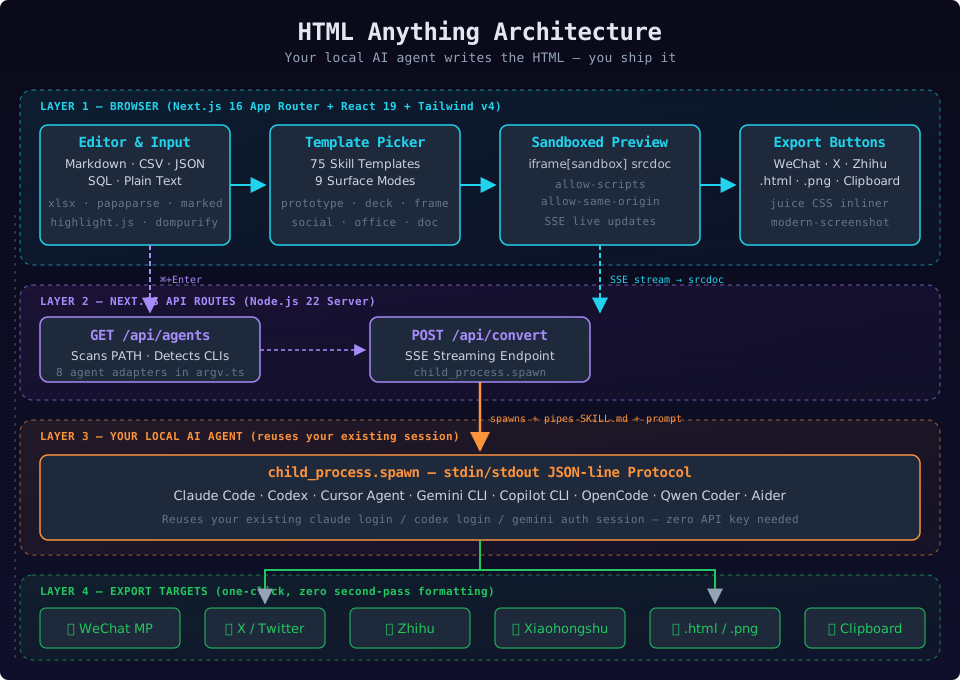
The architecture follows a clean split between the browser layer and your local agent:
-
Browser (Next.js 16 App Router) — The frontend provides the editor, the template picker, the top-bar agent selector, and a sandboxed iframe preview. All processing happens client-side:
juice(CSS inlining),modern-screenshot(PNG export),papaparse/xlsx(spreadsheet parsing), anddompurify(XSS defense). -
Agent Detection (
GET /api/agents) — On boot, the browser calls the server API which scansPATH(including~/.local/bin,~/.bun/bin,/opt/homebrew/bin,~/.npm-global/bin) for recognized CLIs. Each detected agent gets a thin adapter insrc/lib/agents/argv.ts. -
Skill Registry (75 templates) — Every skill lives in
src/lib/templates/skills/<name>/as a folder following the Claude CodeSKILL.mdconvention. Skills are organized by mode (prototype,deck,frame,social,office) and scenario (design,marketing,engineering,product,finance,hr). -
SSE Streaming Render (
POST /api/convert) — When you press ⌘+Enter, the server spawns your chosen CLI viachild_process.spawn, pipes the prompt + skill context to stdin, and streams the stdout JSON-line output as SSE events. The iframesrcdocupdates in real time — you watch the AI draw the page line by line. -
Your Local Agent CLI — Claude Code, Codex, Cursor Agent, Gemini CLI, Copilot CLI, OpenCode, Qwen Coder, or Aider. The agent receives the skill's
SKILL.mdinstructions (hard constraints: CJK-first font stack, 8px baseline grid, contrast ≥ 4.5, must use real data) and your input, then generates a single-file HTML document. -
Export Layer — One-click export to WeChat MP (juice-inlined CSS), X / Xiaohongshu (2× PNG via
ClipboardItem), Zhihu (LaTeX image placeholders), or download as standalone.html/ high-DPI.png.
🚀 Step-by-Step Setup
Step 1: Clone and Install
git clone https://github.com/nexu-io/html-anything
cd html-anything
pnpm install
This installs all dependencies: Next.js, React 19, Tailwind v4, zustand, and the browser-side processing libraries.
Step 2: Start the Development Server
pnpm devOpen http://localhost:3000 in your browser. You should see the editor interface with:
- A top bar showing your detected agent CLIs
- A left pane with a text editor
- A center template picker
- A right pane with a sandboxed iframe preview
Step 3: Verify Agent Detection
Look at the top bar. If you have any supported CLI installed and logged in, you'll see it listed there. If not, check your CLI setup:
# Example: verify Claude Code is available
claude --version
claude login  # if not already logged in

# Example: verify Codex is available
codex --version
The detection scan includes ~/.local/bin, ~/.bun/bin, /opt/homebrew/bin, and ~/.npm-global/bin — directories a GUI-launched Node process normally misses.
Step 4: Pick a Template and Generate
- Click the template picker in the center pane
- Filter by mode (e.g.,
prototypefor web pages,deckfor presentations,socialfor share cards) - Select a skill (e.g.,
saas-landingfor a landing page,magazine-posterfor a poster) - Paste your content in the editor — Markdown, CSV, JSON, SQL, or plain text all work
- Press ⌘+Enter
The SSE stream starts immediately. You'll see the HTML rendering line by line in the iframe preview. Watch it build — don't like where it's going? Interrupt and re-prompt.
Step 5: Export Your Result
Once the generation completes, use the export buttons:
- WeChat MP —
juiceinlines all CSS, paste directly into the WeChat editor - X / Xiaohongshu —
modern-screenshotrenders a 2× PNG, copied to your clipboard - Zhihu — LaTeX equations get
data-eeimgplaceholders for compatibility - Download
.html— Single-file, self-contained - Download
.png— High-DPI screenshot
Step 6: Customize and Re-prompt
Not happy with the output? Edit your prompt and press ⌘+Enter again. The generation is stateless — each run is fresh. You can also switch templates mid-session to try different visual approaches for the same content.
🔧 Configuration and Options
Supported Coding Agents
| Agent | Detection Binary | Session Reuse |
|---|---|---|
| Claude Code | claude |
claude login session |
| OpenAI Codex | codex |
codex login session |
| Cursor Agent | cursor-agent |
cursor login session |
| Gemini CLI | gemini |
gemini auth session |
| GitHub Copilot CLI | copilot |
Copilot subscription |
| OpenCode | opencode-cli / opencode |
opencode config |
| Qwen Coder | qwen |
Qwen API auth |
| Aider | aider |
Aider API key |
Skill Modes
- prototype (21 skills) — Web prototypes, SaaS landing pages, dashboards, docs pages, mobile app mockups, resume, email marketing
- deck (20 skills) — Keynote-style presentations including Swiss International, Guizang Editorial, Hermes Cyber, Replit, XHS Pastel
- frame (12 skills) — Hyperframes video frames, VFX text-cursor, 3D device mockups, motion frames
- social (8 skills) — X quote cards, Spotify-Wrapped style, Reddit threads, Xiaohongshu cards
- office (14 skills) — PM specs, eng runbooks, finance reports, HR onboarding, OKRs, kanban boards, meeting notes
Hard Constraints (Built into Every Skill)
Every SKILL.md enforces:
- CJK-first font stack (Noto Sans/Serif SC for Chinese, Inter/Manrope for Latin)
- 8px baseline grid — every spacing is a multiple of 8
- Color contrast ≥ 4.5 for accessibility
- No pure black or pure white backgrounds
- Must use the user's real data — no lorem ipsum
🐳 Docker-Based Development
You can run HTML Anything in a containerized environment:
# docker-compose.yml
services:
  html-anything:
    image: node:22-slim
    ports:
      - "3000:3000"
    volumes:
      - .:/app
      - /app/node_modules
    working_dir: /app
    environment:
      - NODE_ENV=development
    command: sh -c "pnpm install && pnpm dev"
    stdin_open: true
    tty: true
Note: The agent CLI must be available inside the container. You can either install your preferred CLI in the Dockerfile or bind-mount the host's agent binary + config:
# Dockerfile
FROM node:22-slim
RUN npm install -g pnpm
# Install Claude Code inside container
RUN npm install -g @anthropic-ai/claude-code
COPY . /app
WORKDIR /app
RUN pnpm install
CMD ["pnpm", "dev"]
✅ Verification Checklist
- Server starts:
pnpm dev→http://localhost:3000 - Agent detection shows your CLI(s) in the top bar
- Template picker loads with 75+ skills across all modes
- Pasting Markdown and pressing ⌘+Enter triggers an SSE stream
- Iframe preview updates in real time during generation
- Export to
.htmlproduces a valid single-file document - Export to
.pngproduces a high-DPI image - Different templates produce visually distinct outputs for the same content
🌟 Alternatives
HTML Anything is not the only agentic HTML editor. Here's how it compares:
- Open Design (nexu-io) — The upstream project with 40k+ stars. More focused on design systems and multi-agent workflows. HTML Anything is the focused "HTML editor" version that's simpler to pick up.
- Markdown Nice (mdnice) — Proves the juice-inlined CSS pipeline for WeChat/Zhihu paste compatibility. HTML Anything builds on this concept but adds the agent layer and SSE streaming.
- Hyperframes (heygen-com) — Frame-script spec for motion graphics. HTML Anything's
frame-*skills output conform to this spec and hand off to Remotion for.mp4rendering. - Manual HTML + CSS editing — Traditional approach. HTML Anything automates the layout, grid, CSS, and responsive work so you don't have to touch CSS yourself.
HTML Anything stands out when you want to ship designed HTML content without writing CSS, you already use an AI coding agent, and you need one-click export to multiple platforms including WeChat and X.
📚 Resources
- GitHub: github.com/nexu-io/html-anything
- Open Design (upstream): github.com/nexu-io/open-design
- Skills Directory:
src/lib/templates/skills/in the repo - SKILL.md Convention: docs.anthropic.com/en/docs/claude-code/skills
- Hyperframes Spec: github.com/heygen-com/hyperframes
- License: Apache 2.0