
Glance — The Ultimate Self-Hosted Dashboard for All Your Feeds in One Place
Glance — The Ultimate Self-Hosted Dashboard for All Your Feeds in One Place
What is Glance?
Glance is an open-source, self-hosted dashboard that aggregates all your feeds and information sources in a single, beautiful interface. Think of it as your personal startpage on steroids — RSS feeds, Hacker News, Reddit posts, YouTube uploads, weather forecasts, stock prices, Docker container status, and much more, all arranged in a customizable multi-column layout.
GitHub: github.com/glanceapp/glance
Stars: ⭐ 34,000+
License: AGPL-3.0
Language: Go (single <20 MB binary)
Why this matters: If you're tired of jumping between tabs to check Hacker News, Reddit, your favorite blogs, YouTube channels, stock prices, and the weather — Glance brings everything together in one page. It's fast, lightweight, and runs on any machine with Docker.
Key Features
| Feature | Details |
|---|---|
| Widgets | RSS, Hacker News, Reddit, YouTube, Twitch, Weather, Markets, Releases, Docker, Calendar, Bookmarks, Custom API |
| Performance | Single <20 MB binary, minimal RAM usage, uncached pages load in ~1 second |
| Customizability | Multi-column layouts, multiple pages/tabs, custom CSS, theming |
| Mobile-friendly | Fully responsive design, works great on phones |
| Auth (v0.8+) | Built-in authentication support, optional |
| Docker-native | Official Docker image, one-liner deploy |
Architecture Overview
Glance follows a clean, simple architecture. A single Go binary serves a web dashboard that fetches data from multiple external sources, caches results, and renders everything server-side into a responsive interface.
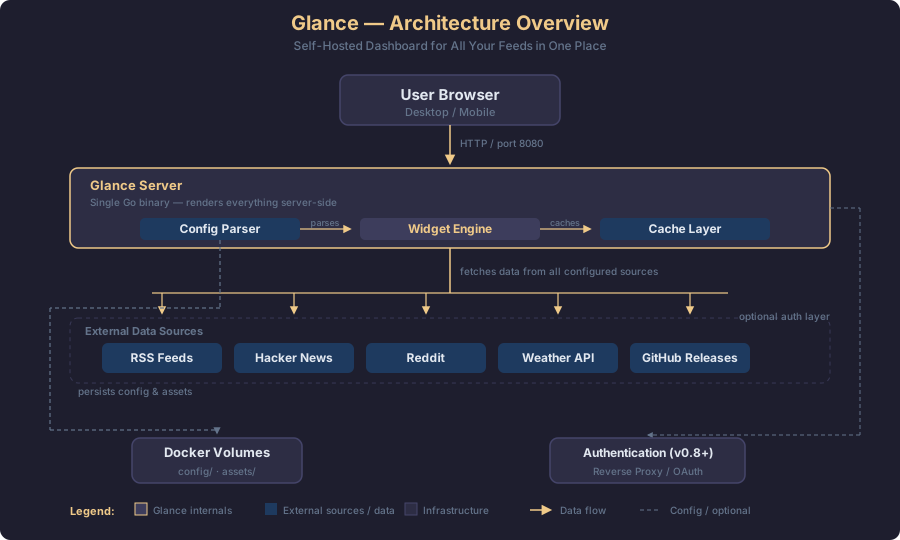
Here's how the data flows:
- User Browser makes an HTTP request to the Glance Server (port 8080)
- The Config Parser reads
glance.ymlto determine page layout, columns, and widget configuration - The Widget Engine fetches data from each configured source (RSS feeds, APIs, etc.)
- Results pass through the Cache Layer with configurable TTLs per widget
- The server renders the HTML and serves it to the browser
- Docker Volumes persist configuration and custom CSS/assets
The architecture is intentionally stateless — no database required, no background workers. Data is fetched on page load and cached for the configured duration.
Prerequisites
- A server with Docker and Docker Compose installed
- A domain or IP address to access the dashboard
- 256 MB RAM minimum (512 MB recommended)
- Optional: a reverse proxy (Nginx, Caddy, or Traefik) for TLS and custom domains
Step-by-Step Setup Guide
Step 1: Create the Project Directory
mkdir -p glance/config && cd glanceStep 2: Create docker-compose.yml
Create a docker-compose.yml file:
services:
glance:
  container_name: glance
  image: glanceapp/glance:latest
  restart: unless-stopped
  ports:
    - "8080:8080"
  volumes:
    - ./config:/app/config
    - ./assets:/app/assets
  environment:
    - TZ=Europe/Paris
Or use the one-liner template from the project:
curl -sL https://github.com/glanceapp/docker-compose-template/archive/refs/heads/main.tar.gz | tar -xzf - --strip-components 2Step 3: Create the Configuration File
Create config/glance.yml with your preferred widgets. Here's a complete example:
pages:
- name: Home
  columns:
    - size: small
      widgets:
        - type: calendar
          first-day-of-week: monday

        - type: rss
          limit: 10
          collapse-after: 3
          cache: 12h
          feeds:
            - url: https://selfh.st/rss/
              title: selfh.st
            - url: https://ciechanow.ski/atom.xml
            - url: https://www.joshwcomeau.com/rss.xml
              title: Josh Comeau

        - type: weather
          location: Paris, France
          units: metric
          hour-format: 24h

    - size: full
      widgets:
        - type: group
          widgets:
            - type: hacker-news
            - type: lobsters

        - type: videos
          channels:
            - UCXuqSBlHAE6Xw-yeJA0Tunw # Linus Tech Tips
            - UCsBjURrPoezykLs9EqgamOA # Fireship
            - UCHnyfMqiRRG1u-2MsSQLbXA # Veritasium

        - type: reddit
          subreddit: selfhosted
          show-thumbnails: true

    - size: small
      widgets:
        - type: markets
          markets:
            - symbol: BTC-USD
              name: Bitcoin
            - symbol: ETH-USD
              name: Ethereum
            - symbol: SPY
              name: S&P 500

        - type: releases
          cache: 1d
          repositories:
            - glanceapp/glance
            - immich-app/immich
            - syncthing/syncthing

        - type: bookmark
          links:
            - icon: github
              url: https://github.com
              text: GitHub
            - icon: docker
              url: https://hub.docker.com
              text: Docker Hub
Step 4: Start Glance
docker compose up -dVerify it's running:
docker compose psYou should see:
NAME      IMAGE                      STATUS          PORTS
glance    glanceapp/glance:latest    Up 2 minutes    0.0.0.0:8080->8080/tcp
Open your browser and go to http://YOUR_SERVER_IP:8080. You should see your dashboard with all configured widgets.
Step 5: Add Authentication (Optional)
Since v0.8.0, Glance supports built-in authentication. Add this to your glance.yml:
theme:
  light: dark

authentication:
  method: basic
  users:
    - username: admin
      password: your-secure-password
Then restart:
docker compose restartStep 6: Set Up a Reverse Proxy (Recommended)
For production use, put Glance behind a reverse proxy with TLS. Here's a Caddy example:
dashboard.yourdomain.com {
    reverse_proxy glance:8080
}
And update your docker-compose.yml to join the proxy network:
services:
  glance:
    # ... existing config ...
    networks:
      - proxy
      - default

networks:
  proxy:
    external: true
Widget Reference
Here's a quick reference of all available widgets:
- RSS — Subscribe to any RSS/Atom feed
- Hacker News — Top stories from news.ycombinator.com
- Reddit — Posts from any subreddit
- Lobsters — Top stories from lobste.rs
- YouTube — Latest uploads from any channel
- Twitch — Online status of Twitch channels
- Weather — Forecast from Open-Meteo (no API key needed)
- Markets — Stock prices and crypto quotes
- Releases — Latest GitHub releases for tracked repos
- Docker Containers — Status of running Docker containers
- Calendar — A simple monthly calendar
- Bookmarks — Custom link collections
- Monitor — HTTP endpoint health checks
- Server Stats — CPU, RAM, disk usage
- Custom API — Fetch JSON from any API and render custom HTML
- HTML — Embed arbitrary HTML content
- iFrame — Embed external websites
Verification Checklist
- Dashboard loads at
http://YOUR_IP:8080 - All configured widgets display content
- RSS feeds show recent articles
- Weather widget shows correct location and forecast
- YouTube widget shows latest videos
- Markets widget shows current prices
- Calendar widget displays current month
- Mobile viewport is responsive and readable
- (Optional) Authentication works on page refresh
- (Optional) TLS certificate works via reverse proxy
Tips & Best Practices
- Start simple — Add a few widgets first, then expand. Don't overload your first config file.
- Use the
cacheparameter — Setcache: 5mfor time-sensitive widgets like markets,cache: 1hfor feeds. - Create multiple pages — Use the
pagesarray to create separate tabs for different categories (Tech News, Finance, Social). - Custom CSS — Create an
assets/user.cssfile to customize colors, fonts, and layout beyond the built-in themes. - Pi-Hole users — If requests time out, increase the rate limit in your ad-blocking DNS service, which defaults to a low threshold.
- GitHub token — Add a read-only token for the releases widget to avoid hitting the 60 req/h unauthenticated limit.
# In glance.yml, under releases widget:
- type: releases
  token: ghp_your_readonly_token
  repositories:
    - glanceapp/glance
Troubleshooting
Dashboard loads but widgets are empty
→ Check the logs: docker compose logs. Most issues are DNS-related or the external source being unreachable.
"cannot unmarshal !!map into []glance.page" error
→ You have a pages key at the top of an included page file. Remove it — included pages should only contain column definitions.
Broken layout with Dark Reader extension
→ Add dashboard.yourdomain.com to Dark Reader's ignore list, or disable it for the site.
Requests timing out
→ Common with Pi-Hole/AdGuard Home. Increase the rate limit in those services, or add networks: podman: external: true if using Podman.